Kinetic typography with a voiceover: how words sync to the voice, with measured timings
Add a voiceover to a kinetic typography video in your browser and have each word or short phrase appear as the voice says it. Measured voice lengths, how many words fit in 30 seconds, and how to write a script that syncs cleanly.
Published November 27, 2026 · By the TypographyEdit team · All posts
What the voiceover does, in one paragraph
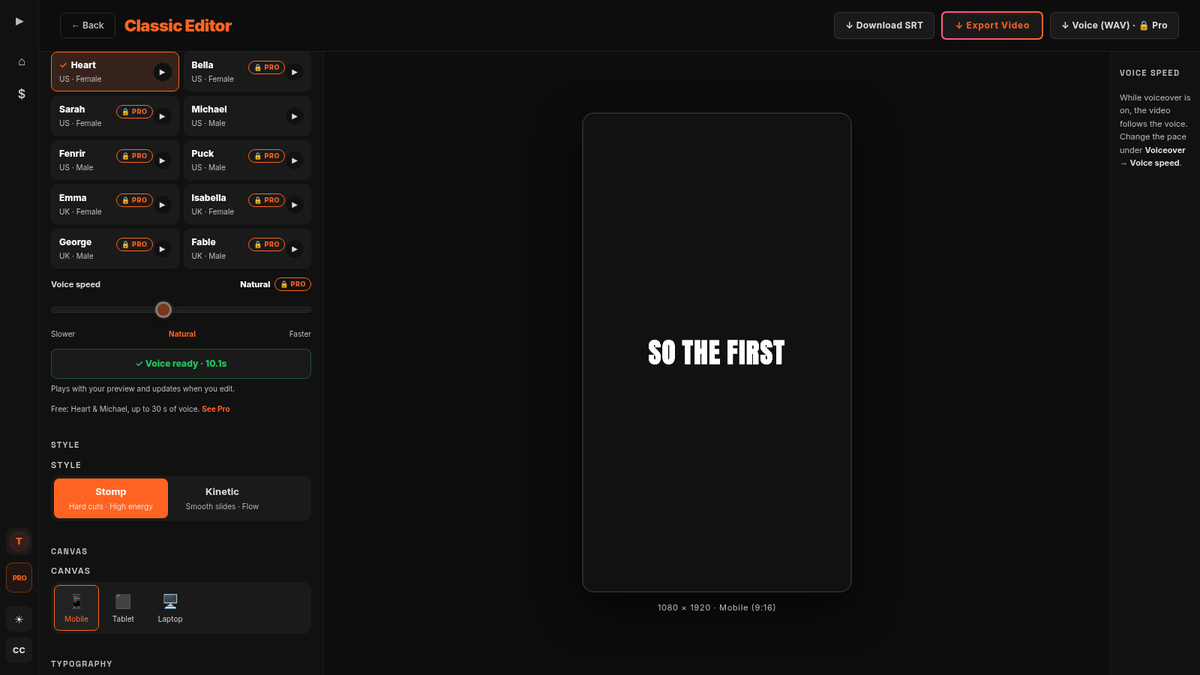
You paste a script, a synthetic voice reads it, and every word or short phrase of the animation appears as the voice says it. You don't drag anything on a timeline. The voice is generated on your own computer or phone by Kokoro-82M, an open-weight text-to-speech model with 82 million parameters and Apache-licensed weights. Your script isn't sent to a voice service. The first time, the browser downloads the model, about 92 MB, and keeps it for next time.
On the free plan you get two voices (Heart and Michael), up to 30 seconds of voice, natural speed only, and the usual small watermark on the free Classic style. Pro, at $9 USD a month, adds the other eight voices, any length, a voice speed slider from 0.7× to 1.4×, and a download of the voice on its own as a WAV file.
Everything below was measured in the current editor on November 27, 2026: real voice lengths, real caption timings, and the rules the editor uses to decide which words share the screen.
Make one, start to finish
- Paste the script. Open the editor, paste your lines into Your script and click Generate styles.
- Pick Classic and sign in. Click Edit & Export on Classic, the free style, and sign in with Google. No payment details are needed.
- Set the canvas first. Under Canvas, choose Mobile for 1080 × 1920 (Reels, TikTok, Shorts). The default is Laptop, 16:9.
- Turn on the voice. Flip the Add voiceover switch, pick Heart or Michael, and click Turn on voice · one-time 92 MB download. The button shows Getting voices ready, then Generating voice, then Voice ready with the length in seconds.
- Watch it, then edit. The preview plays with the voice. If you change a word, the voice is made again for your latest text.
- Export. Export Video renders an MP4 with the voice in your browser; keep the tab open. Download SRT gives you captions with the same timings as the animation.
On our test machine, an eight-core Linux box with no graphics card, the first run, model download included, took about 22 to 24 seconds for a 10-second voice. A phone is much slower; the editor warns that it can take a minute or more there.
How long the voice runs: measured lengths
We ran the same scripts through the editor with Heart and read the length off the Voice ready label. Words per minute is word count divided by that length, so it includes the short lead-in, the pauses between sentences and the short tail at the end.
| Script | Voice speed | Voice length | Words per minute |
|---|---|---|---|
| 25 words, 5 short sentences | Natural (1×) | 10.1 s | about 149 |
| 66 words, 7 sentences | 0.7× (Pro) | 31.7 s | about 125 |
| 66 words, 7 sentences | Natural (1×) | 22.8 s | about 174 |
| 66 words, 7 sentences | 1.4× (Pro) | 16.3 s | about 243 |
| 85 words, 8 sentences | Natural (1×) | 28.9 s | about 176 |
Two things fall out of this:
- The free 30 seconds holds roughly 85 words of normal prose. Our 85-word script came to 28.9 s. Short punchy lines run slower because every full stop, question mark or exclamation mark adds a pause of about a third of a second. At the rate of our short-line script, 30 seconds holds about 74 words. If the script is clearly too long, the editor won't start generating, and if the finished voice is over 30 seconds, it tells you before you export.
- Sentence count matters as much as word count. Cutting one sentence break saves about as much time as cutting a word.
Voice pace against reading pace
The BBC's subtitle guidelines recommend 160 to 180 words per minute for subtitles, or about 0.3 seconds per word on screen. That's a useful yardstick for animated text too, and it lines up neatly with the voice:
- Natural (about 174 wpm on ordinary prose) sits inside the BBC range. Viewers who watch with the sound off can still read along. This is the safe default and the only speed on Free.
- 1.4× (about 243 wpm) is well past it. It works for a fast hook where the words are a few big beats, but phrases flash by faster than most people read. Use it on short scripts, not on anything you want quoted back.
- 0.7× (about 125 wpm) is calm. It suits quotes, teaching and anything with numbers or names in it. It also makes the video about 40% longer, so check it against your platform's length.
To plan timings before you add a voice, the free text timing calculator works out on-screen seconds per line from the same BBC and Netflix figures.
Why some words share the screen
Without a voice, Classic shows one word at a time at a fixed rate. With a voice, each word starts where it's spoken, but the editor won't let a card flash past before its entrance animation has finished. Words are grouped until each card lasts at least 12 frames (0.4 s at 30 fps) in the Stomp style, or 22 frames (about 0.73 s) in Kinetic. Fast, short words get grouped; slow or stressed words get a card of their own.
Here's the same 25-word script with the same voice, from the editor's SRT export. Times are when each card appears:
| Time | Stomp: 12 cards | Kinetic: 9 cards |
|---|---|---|
| 0.10 s | Most people | Most people |
| 0.83 s | decide | decide in the |
| 1.27 s | in the first | (still on screen) |
| 1.63 s | (still on screen) | first second. |
| 2.00 s | second. | (still on screen) |
| 2.87 s | So the first | So the first line |
| 3.43 s | line has | (still on screen) |
| 3.70 s | (still on screen) | has to land. |
| 3.90 s | to land. | (still on screen) |
| 5.23 s | Write the hook. | Write the hook. |
| 6.70 s | Paste the | Paste the script. |
| 7.13 s | script. | (still on screen) |
| 8.37 s | Let the voice | Let the voice set the |
| 8.87 s | set the pace. | (still on screen) |
| 9.13 s | (still on screen) | pace. |
Look at the end of the Kinetic column: Let the voice set the on one card, then pace. alone. The grouping is purely about time, so it can split a phrase where you wouldn't. Three ways to steer it:
- Use punctuation. A full stop gives a pause, and the next card starts after it. If you want Stop. to hit alone, make it its own sentence.
- Switch to Stomp for fast scripts. Its shorter minimum keeps more words on their own cards.
- Slow the voice (Pro). At 0.7× more words clear the minimum and get a card each.
Write the script for the ear and the eye
- Spell out numbers when sync matters. The editor matches the words the voice speaks to the words you typed. "2026" is spoken as several words, so for that sentence the editor falls back to spreading the timing by letter count. It's close, not exact. "Twenty twenty-six" keeps every word on its syllable.
- Lone symbols ride along. A dash or ampersand on its own isn't spoken, so it appears with the word before it.
- Very long sentences get split. At 24 words or more, the editor breaks a sentence at a comma, semicolon, colon or dash and leaves a short pause there. If you don't want a pause in a particular spot, rewrite it as two sentences and choose the break yourself.
- Punctuation is your only direction. There's no emotion or emphasis control. Commas, question marks and sentence length shape the delivery. Read the line aloud the way you want it said, then punctuate what you hear.
- English only. The ten voices are American and British English.
Choosing between the ten voices
The grades below are from Kokoro's own voice list, where the authors estimate the quality and amount of training data behind each voice, which affects how it sounds. They also note that voices sound better or worse to different people, so play the samples. Every voice card in the editor has a play button.
| Voice | Accent | Kokoro grade | Plan |
|---|---|---|---|
| Heart | US, female | A | Free and Pro |
| Michael | US, male | C+ | Free and Pro |
| Bella | US, female | A- | Pro |
| Sarah | US, female | C+ | Pro |
| Fenrir | US, male | C+ | Pro |
| Puck | US, male | C+ | Pro |
| Emma | UK, female | B- | Pro |
| Isabella | UK, female | C | Pro |
| George | UK, male | C | Pro |
| Fable | UK, male | C | Pro |
In practice: Heart is the strongest voice and it's free. Bella is the other A-grade voice. Emma is the best-graded British voice. The C-grade voices are usable but worth a listen before you commit a client video to them.
Labelling a synthetic voice on TikTok and YouTube
The voice is synthetic speech, and both big platforms have rules about that. We're not lawyers and the rules change, so read the pages yourself, but here's what they say today:
- TikTok requires creators to label AI-generated content that contains realistic images, audio and video, and says turning on the AI-generated content setting won't affect distribution as long as the video follows its Community Guidelines. A natural-sounding narrator arguably counts as realistic audio, so turning the setting on is the safe call.
- YouTube requires disclosure of realistic content such as making a real person appear to say something they didn't. Its list of things that don't need disclosure includes using generative tools for production help and cloning your own voice for voiceovers. A stock narrator voice reading your own words over animated text is on neither list. YouTube says disclosure alone won't limit a video's audience or its eligibility to earn money, so if you're unsure, disclose.
Don't use any synthetic voice to make it sound like a real, identifiable person said something. TikTok bans some of that outright, YouTube requires it to be disclosed, and it isn't what this feature is for.
What it won't do
- No music. The MP4 has the voice and nothing else. Add a track afterwards in TikTok, Instagram's Edits, CapCut or any editor.
- No recording or upload of your own voice. If you want your own read, record it separately and time the text by hand in a timeline editor. Our kinetic typography tools comparison covers the options.
- No manual pacing while the voice is on. The voice sets the pace. The video speed control is replaced by Voice speed, which is fixed at Natural on Free.
- Free limits. Two voices, 30 seconds of voice, Classic with a watermark. The WAV download of the voice is Pro only.
If those fit what you're making, it's the quickest route we know from a written script to a word-synced, voiced typography video. Paste a script and try it →
Related reading
- How to make a typography video for TikTok: upload specs and keeping long words clear of the button column
- What is typography editing? Both meanings, with a copyable beat sheet
- Kinetic typography without After Effects
- 9:16 safe zone checker for Reels, TikTok and Shorts
- Turn a short script into a typography video and the other guides
- TypographyEdit home · Pricing · Documentation
Sources
- hexgrad/Kokoro-82M model card on Hugging Face
- Kokoro-82M VOICES.md (voice grades)
- BBC Subtitle Guidelines (subtitle speed)
- TikTok Help Center: About AI-generated content
- YouTube Help: Disclosing use of GenAI content
- TypographyEdit pricing
All external pages checked November 27, 2026. Voice lengths and caption timings measured in the TypographyEdit editor with the Heart voice on November 27, 2026; the grouping minimums and the pause after each sentence are from the editor's code. TikTok and YouTube are trademarks of their respective owners. TypographyEdit is not affiliated with either.