SRT reading speed checker: CPS, WPM and gaps for subtitles and captions
Paste or open a subtitle file and see every cue's characters per second, words per minute, duration and gaps, checked against Netflix or BBC rules. Then download a fixed SRT, or copy the text out as a script. Free, no sign-up, nothing uploaded.
| # | Starts | On screen | Text | Chars | CPS | WPM |
|---|---|---|---|---|---|---|
| 1 | 0:00.10 | 0.73 s | Most people ⚠ Too short: 0.73 s on screen (minimum 0.83 s). ⚠ Gap to next cue is under 2 frames (0 at 30 fps). | 11 | 15.0 | 164 |
| 2 | 0:00.83 | 0.43 s | decide ⚠ Too short: 0.43 s on screen (minimum 0.83 s). ⚠ Gap to next cue is under 2 frames (0 at 30 fps). | 6 | 13.8 | 138 |
| 3 | 0:01.27 | 0.73 s | in the first ⚠ Too short: 0.73 s on screen (minimum 0.83 s). ⚠ Gap to next cue is under 2 frames (0 at 30 fps). | 12 | 16.4 | 246 |
| 4 | 0:02.00 | 0.87 s | second. ⚠ Gap to next cue is under 2 frames (0 at 30 fps). | 7 | 8.1 | 69 |
| 5 | 0:02.87 | 0.57 s | So the first ⚠ Too fast: 21.2 characters per second (limit 20). ⚠ Too short: 0.57 s on screen (minimum 0.83 s). ⚠ Gap to next cue is under 2 frames (0 at 30 fps). | 12 | 21.2 | 318 |
| 6 | 0:03.43 | 0.47 s | line has ⚠ Too short: 0.47 s on screen (minimum 0.83 s). ⚠ Gap to next cue is under 2 frames (0 at 30 fps). | 8 | 17.1 | 257 |
| 7 | 0:03.90 | 1.33 s | to land. ⚠ Gap to next cue is under 2 frames (0 at 30 fps). | 8 | 6.0 | 90 |
| 8 | 0:05.23 | 1.47 s | Write the hook. ⚠ Gap to next cue is under 2 frames (0 at 30 fps). | 15 | 10.2 | 123 |
| 9 | 0:06.70 | 0.43 s | Paste the ⚠ Too fast: 20.8 characters per second (limit 20). ⚠ Too short: 0.43 s on screen (minimum 0.83 s). ⚠ Gap to next cue is under 2 frames (0 at 30 fps). | 9 | 20.8 | 277 |
| 10 | 0:07.13 | 1.23 s | script. ⚠ Gap to next cue is under 2 frames (0 at 30 fps). | 7 | 5.7 | 49 |
| 11 | 0:08.37 | 0.50 s | Let the voice ⚠ Too fast: 26.0 characters per second (limit 20). ⚠ Too short: 0.50 s on screen (minimum 0.83 s). ⚠ Gap to next cue is under 2 frames (0 at 30 fps). | 13 | 26.0 | 360 |
| 12 | 0:08.87 | 1.57 s | set the pace. | 13 | 8.3 | 115 |
Fixed file: 5 cues, 0 with issues (7 merged, 0 extended, 0 trimmed, 4 gaps changed)
Runs entirely in this page; your file is not uploaded anywhere. CPS = characters ÷ seconds on screen, line breaks not counted. Formatting tags like <i> and {\an8} are ignored when counting and left out of the fixed file. Fixes never move a start time.
What each preset checks
There is no single reading-speed law. The two most detailed public rulebooks come from Netflix and the BBC, and they measure different things: Netflix counts characters, the BBC counts words. The checker applies whichever you pick, with these limits, all taken from the pages linked below on November 28, 2026.
| Rule | Netflix English (adult / children) | BBC |
|---|---|---|
| Reading speed | Up to 20 characters per second for adult programs, 17 for children's | 160–180 words per minute; the checker flags anything over 180 |
| Shortest cue | 5/6 of a second (20 frames at 24 fps) | About 0.3 s per word, e.g. 1.2 s for four words |
| Longest cue | 7 seconds | No fixed maximum; match the pace of speech |
| Line length | 42 characters, 2 lines maximum | 37 characters for broadcast; online, a share of the frame width. The BBC's own guide equates that to about 25 characters in 9:16 vertical video, where it recommends up to three lines |
| Gaps | At least 2 frames between cues at any frame rate. A gap is either exactly 2 frames or half a second or more | If you leave a gap for a pause, at least 1 second, preferably 1.5 |
Sources: Netflix English (USA) Timed Text Style Guide (sections I.2 and I.14), Netflix Timed Text Style Guide: General Requirements (duration, line treatment), Netflix Subtitle Timing Guidelines (gaps), BBC Subtitle Guidelines (line length, timing, gaps). All checked November 28, 2026.
Two judgement calls are ours, and you should know them. Netflix doesn't say whether spaces count as characters, so the checker counts them by default and gives you a switch. And the BBC doesn't set a frame gap for back-to-back cues, so the BBC presets treat any gap of 2 frames or less as chained and only flag gaps between that and 1 second.
Worked example: a real word-by-word export
The file loaded above is not made up. It's the SRT that TypographyEdit's editor exported for a 25-word script, Classic template, Stomp style, Heart voice at natural speed. We used the same export in our voiceover timing post. Each cue is one animated card, timed to the voice.
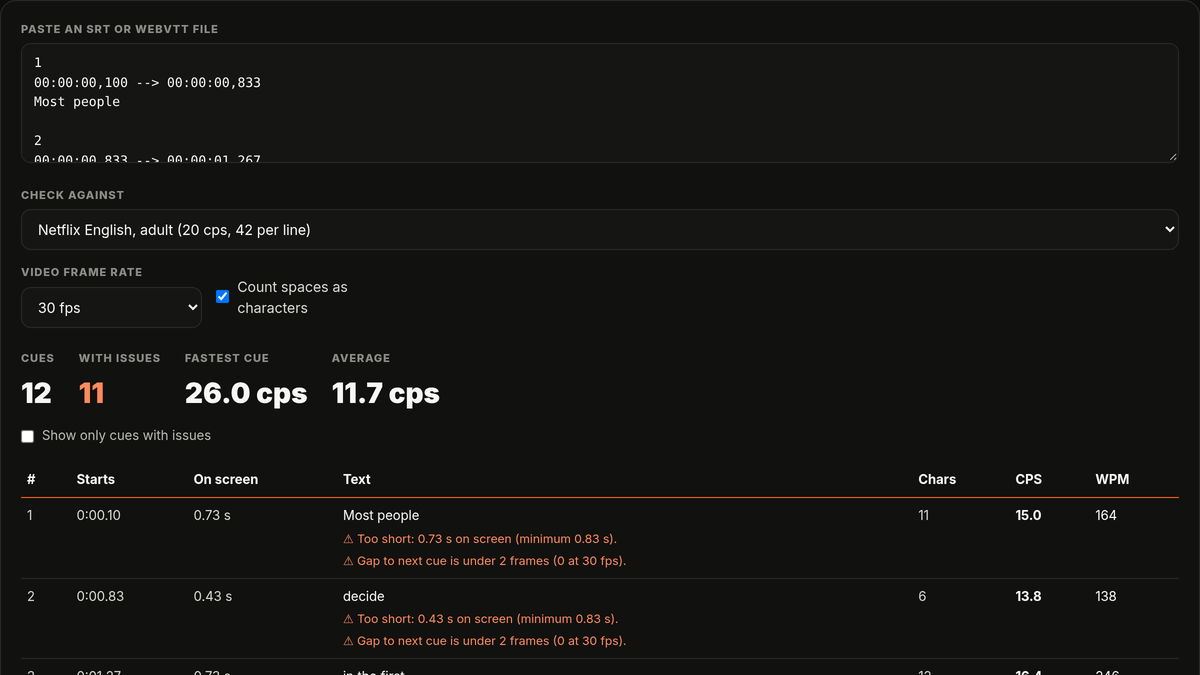
Against Netflix's adult preset, 11 of its 12 cues fail:
| Cue | On screen | CPS | Netflix problem |
|---|---|---|---|
| Most people | 0.73 s | 15.0 | Under 5/6 s |
| decide | 0.43 s | 13.8 | Under 5/6 s |
| in the first | 0.73 s | 16.4 | Under 5/6 s |
| second. | 0.87 s | 8.1 | Gap |
| So the first | 0.57 s | 21.2 | Too fast, under 5/6 s |
| line has | 0.47 s | 17.1 | Under 5/6 s |
| to land. | 1.33 s | 6.0 | Gap |
| Write the hook. | 1.47 s | 10.2 | Gap |
| Paste the | 0.43 s | 20.8 | Too fast, under 5/6 s |
| script. | 1.23 s | 5.7 | Gap |
| Let the voice | 0.50 s | 26.0 | Too fast, under 5/6 s |
| set the pace. | 1.57 s | 8.3 | None |
Look at the CPS column first. Only three cues are too fast to read: "So the first" (21.2) and "Paste the" (20.8) only just, "Let the voice" (26.0) clearly. The real problem is shape, not speed. Seven cues are on screen for less than 5/6 of a second, and every cue butts straight into the next with no 2-frame gap, which is what "Gap" means above.
With all three fixes on, the checker merges the fragments back into sentences, and the file passes:
| Starts | Cue | On screen | CPS |
|---|---|---|---|
| 0:00.10 | Most people decide in the first second. | 2.70 s | 14.4 |
| 0:02.87 | So the first line has to land. | 2.30 s | 13.0 |
| 0:05.23 | Write the hook. | 1.40 s | 10.7 |
| 0:06.70 | Paste the script. | 1.60 s | 10.6 |
| 0:08.37 | Let the voice set the pace. | 2.07 s | 13.1 |
Twelve cues became five. Start times stayed where the voice put them, so nothing appears before it's said. Each merged cue ends 2 frames before the next one starts.
Switch the preset to BBC 16:9 and the picture changes: 5 of the original 12 fail, all for running over 180 words per minute ("in the first" is three words in 0.73 s, which is 246 wpm). After fixing, the BBC version keeps "Most people" as its own cue, because at 164 wpm it was already fine.
Animated words are not subtitles
So is TypographyEdit's export broken? No. It's doing a different job. In a kinetic typography video the words are the picture: big, centred, one beat at a time, and the beat is the point. Two or three words flashing by at 0.4 seconds is a style choice when they fill the frame and the viewer has nothing else to read.
The trouble starts when that file is used as closed captions. Upload a word-by-word SRT to YouTube as subtitles and viewers who switch captions on get a small line at the bottom that changes more than once a second, on top of a video that already shows the same words. If you want closed captions for a typography video, or for anything cut with word-level captions, run the file through the merge fix first. YouTube's help page lists SRT as a supported basic format, but says no style markup is recognised and the file must be plain UTF-8. The fixed file the checker gives you is plain text with tags removed, saved as UTF-8 (YouTube Help: Supported subtitle and closed caption files).
The opposite also holds. If you're judging burned-in animated text, don't hold it to the 42-character, 5/6-second standard. Use the BBC's words-per-minute figure as a ceiling for how fast the words go by, and plan the beats with the text timing calculator, which adds time for the animation itself.
How the fixes work
- Merge flashy cues. A cue that's too short or too fast is joined to its neighbour if they're less than half a second apart. Once it starts merging, it carries on to the end of the sentence, as long as the text still fits the preset's line length and line count and the cue stays under the maximum duration. Text is rewrapped into balanced lines, preferring to break after punctuation.
- Extend short, trim long. A cue under the minimum is extended into free time after it, stopping 2 frames before the next cue. A cue over 7 seconds (Netflix) is cut to 7.
- Fix gaps and overlaps. For Netflix, any gap that isn't exactly 2 frames and is under half a second becomes 2 frames, which is what Netflix calls chaining. For the BBC presets, overlaps are removed and gaps under 1 second are chained.
None of the fixes rewrite words. If a cue is still too fast after merging, the honest fix is to edit the text, and the checker leaves that to you. Expect near-misses: on BBC rules the merged "So the first line has to land." runs at 178 wpm. Take 2 frames off its end for a Netflix-style gap and it would be 183, over the BBC line. It passes Netflix anyway, because Netflix counts characters and that's only 13 per second.
From subtitles to a typography script
"Copy text as a script" strips the timings and gives you one cue per line. Paste that into TypographyEdit as your script. The editor sets the beats itself: Classic without a voiceover shows one word at a time, and Dynamic groups words into scenes. So the line breaks are your plan of sentences, not a beat map. It's a quick way to turn the captions from a talking-head video, or a podcast transcript, into a kinetic typography version. Trim it first: subtitle text is written to be read under a picture, and a typography video usually wants far fewer words.
What it doesn't check
- Sync to the audio. It can't hear the video, so it can't tell you a cue is late.
- Shot changes. Netflix and the BBC both want cues to respect cuts; that needs the video.
- Where lines break. It counts line lengths but doesn't judge whether a break splits an article from its noun.
- Spelling, speaker labels and sound descriptions.
- Other languages. The limits here are for English; Netflix publishes separate guides for other languages.
Related
- Text timing calculator: plan seconds and frames per line before you animate
- 9:16 safe zone checker: keep text clear of Reels, TikTok and Shorts buttons
- Kinetic typography with a voiceover: how the cards in the example get their timing
- Make kinetic typography readable on a small screen
- Need captions made from speech in the first place? Auto Captions, from the same makers, exports SRT and VTT.
- TypographyEdit home · Pricing · Documentation