How to make a typography video for TikTok, free: script, timing and the button-column problem
A free, step-by-step way to turn a script into a 1080×1920 typography video for TikTok, with exact per-word timings, TikTok's upload specs, and why long words end up under the like button.
Published November 26, 2026 · By the TypographyEdit team · All posts
What you end up with
A vertical 1080 × 1920 MP4 where your script plays one word at a time, big and centred, ready to upload to TikTok. It costs nothing on the free plan. The trade-offs: the free Classic style carries a small TypographyEdit watermark in the bottom-right corner, you sign in with Google before the editor opens, and the file has no music. You add the sound in TikTok.
This walkthrough uses the real editor and its real numbers. The timing table and the safe-zone measurement below come from TypographyEdit's source code and TikTok's own overlay files, not rules of thumb.
Check the file against TikTok's numbers first
TikTok's developer documentation is the most precise public spec for what it accepts. Here is how a TypographyEdit export lines up:
| TikTok accepts | TypographyEdit exports | |
|---|---|---|
| Container | MP4 (recommended), WebM or MOV | MP4 |
| Video codec | H.264 (recommended), H.265, VP8 or VP9 | H.264 |
| Frame rate | 23 to 60 fps | 30 fps |
| Picture size | 360 to 4096 px on each side | 1080 × 1920 in the Mobile (9:16) canvas |
| Length | Uploads in the app up to 60 minutes; via the posting API, 3 minutes for all creators | Set by your word count and speed (table below) |
TikTok figures from the Content Posting API media transfer guide and the Help Center camera tools page, both checked November 26, 2026. The API limits apply to third-party posting; the in-app upload limit is from the Help Center. Your own account may show a different maximum.
Nothing to convert. Export, move the file to your phone, upload.
Write the script for one word at a time
Classic doesn't lay out sentences. It splits your script on spaces and shows each word as its own beat, centred on the frame. That changes how you write. Long words get a beat to themselves, small words like "the" and "of" flash past at the same speed as the important ones, and punctuation adds no pause.
Here is the script used for this post, 31 words in six lines:
Your first line is the hook.
Put the point on screen first.
One idea per line.
Big type. Short words.
Keep it clear of the buttons.
End on one strong word.
Cut filler before you paste. Every "really" and "just" costs the same screen time as your key word. If a line still reads well with a word removed, remove it.
How long it will run
Every word in Classic gets the same number of frames. The count depends on the Style (Stomp cuts hard between words; Kinetic slides) and on the Speed slider, which goes from 0.25× to 6× and starts at 2×. There's also a floor, so a word never disappears before its entrance animation has finished. That floor is why pushing the slider past about 1.7× in Stomp, or 1.5× in Kinetic, changes nothing.
| Speed | Stomp, per word | Kinetic, per word | Our 31-word script in Stomp |
|---|---|---|---|
| 0.5× | 40 frames (1.33 s) | 64 frames (2.13 s) | 41.3 s |
| 1× | 20 frames (0.67 s) | 32 frames (1.07 s) | 20.7 s |
| 1.5× | 13 frames (0.43 s) | 22 frames (0.73 s) | 13.4 s |
| 2× (default) | 12 frames (0.40 s) | 22 frames (0.73 s) | 12.4 s |
| 4× or 6× | 12 frames (0.40 s) | 22 frames (0.73 s) | 12.4 s |
At 30 fps. Worked out from the Classic timing code: Stomp uses 20 frames per word at 1× and never fewer than 12; Kinetic uses 32 and never fewer than 22.
To get a total for your script, multiply your word count by the per-word time. In Kinetic at the default speed, our 31 words run 22.7 seconds.
Is 0.4 seconds a word fast enough? For reference, the BBC's subtitle guidelines recommend 160–180 words per minute, about 0.33 to 0.375 seconds per word. Stomp at 2× works out to 150 words per minute, a touch slower than that. Those guidelines cover subtitles, not single words flashing in the middle of the screen, so treat them as a sanity check. Watch it on a phone, at full speed, before you decide. Want different timing per line instead of per word? Plan it in the text timing calculator.
The TikTok catch: long words run under the buttons
Classic centres every word at the middle of the frame, y = 960 on a 1920-pixel-tall video. On TikTok, that height is exactly where the like, comment and share column sits. Measured from TikTok's standard In-Feed safe-zone overlay (linked from its In-Feed ads help page), the column covers x 780–960 and y 840–1260 on a 1080 × 1920 frame.
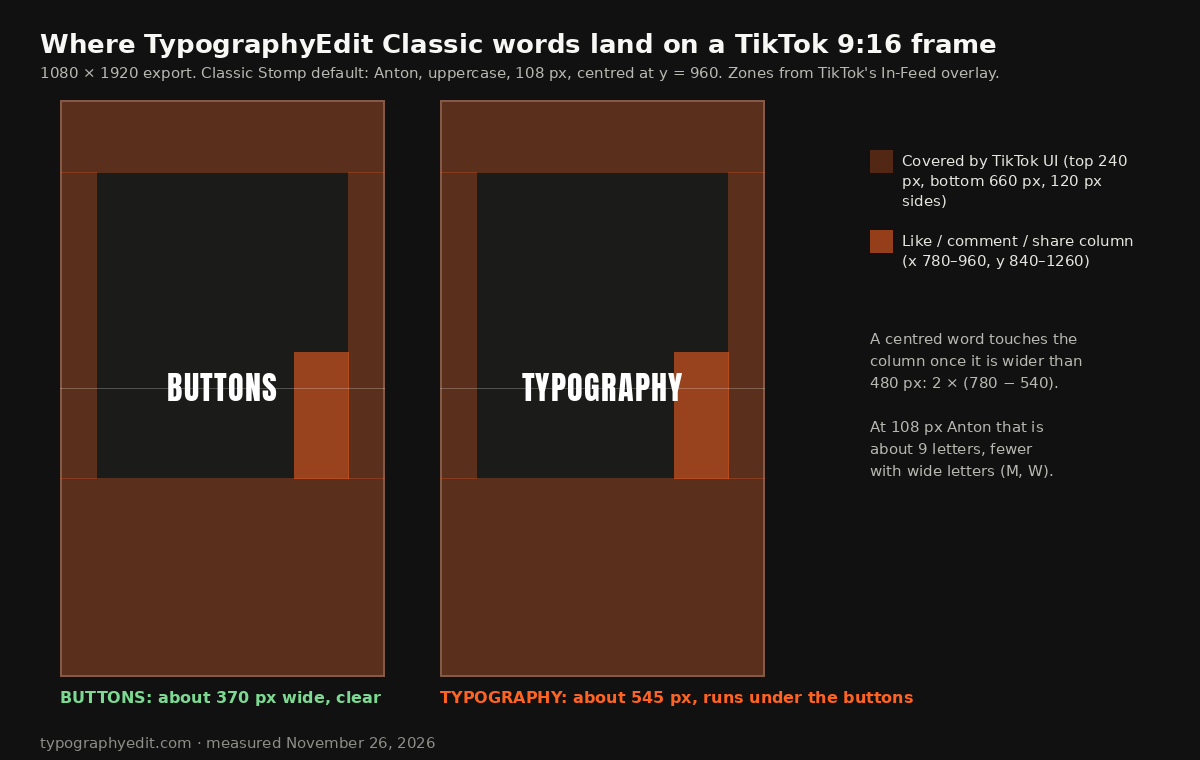
A centred word reaches that column once it is wider than 480 pixels, because the column starts 240 pixels right of centre. Classic's default Stomp text is Anton, uppercase, at 108 pixels (10% of the frame width). We measured rendered widths in Chrome: BUTTONS is about 370 px wide and clears it. INSTAGRAM is about 495 px and just reaches it. TYPOGRAPHY is about 545 px and runs under the icons.
The practical rule: with the default font, keep words to eight letters or fewer, or accept that the right edge of a long word sits under TikTok's icons for that beat. Wide letters like M and W hit the limit sooner. Three more things to watch:
- Slam overshoots. The default Slam entrance starts each word at 1.5× size and springs down to full size. During those first frames, a word only 320 px wide at rest will briefly reach the column. That's a flicker, not a problem, but don't stack your most important long word on a Slam.
- Font choice changes the limit. Anton is a condensed face. Switch Normal Words to a wider font in the Typography panel and fewer letters fit before the column.
- BG words are bigger. Words set as BG use a font size of 18% of the frame width (194 px) at 15% opacity. They're meant to sit behind the action, so their overlap matters less, but don't put a word you need read there.
For multi-line layouts, other templates, or Reels and Shorts, check your text in the 9:16 safe zone checker.
Make it in TypographyEdit, step by step
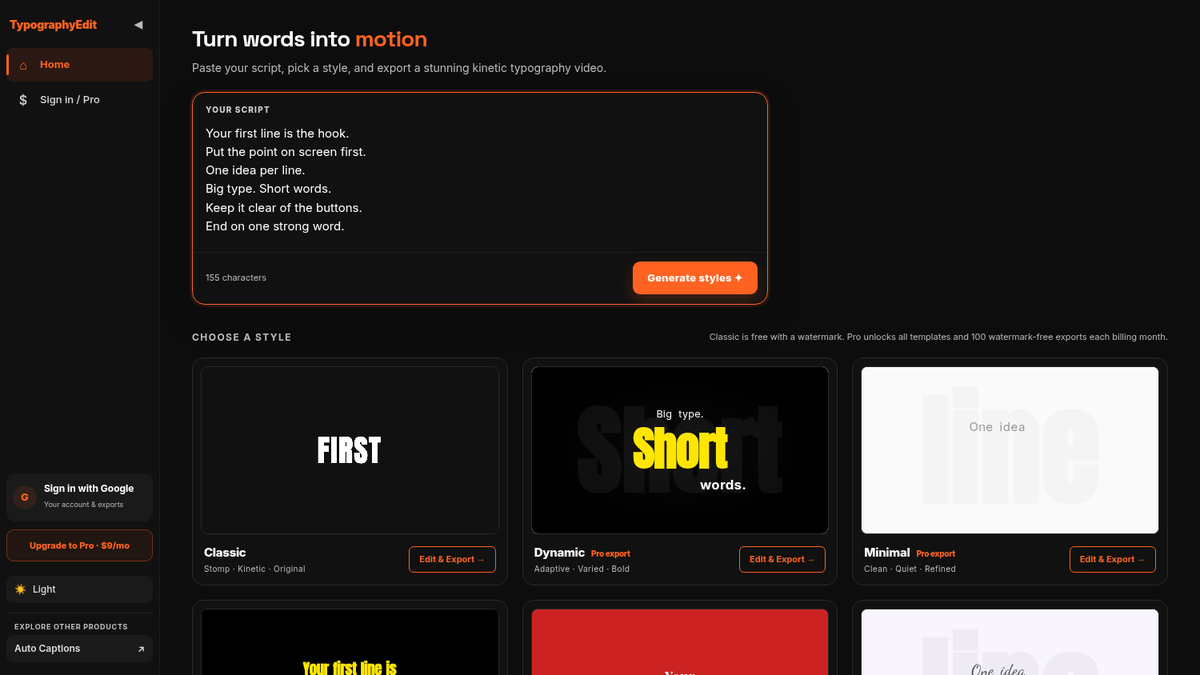
- Paste the script. Open the dashboard, paste into Your Script and click Generate styles. Every style previews your words, as in the screenshot at the top of this post. You don't need an account to see the previews.
- Pick Classic. It's the free style. Click Edit & Export and sign in with Google. Signing in costs nothing.
- Switch the Canvas to Mobile (9:16). A new Classic project starts in Laptop (16:9). Forget to switch and you'll export a horizontal 1920 × 1080 file instead of a vertical one.
- Choose Stomp or Kinetic. Stomp suits hooks, lists and anything punchy. Kinetic is calmer and gives each word almost twice the screen time.
- Set the speed with the table above. For a first TikTok, 2× Stomp is a sensible default. Drop to 1.5× if testers miss words.
- Mark two or three keywords. In word mode, click a word and set it to Keyword. It takes the highlight colour, and you can give it its own font and entrance (Slam, Slide or Fade). In our script: hook, point, buttons. If every third word is a keyword, none of them is.
- Set colours. Background, Text and Highlight live in the Colors panel. Keep the contrast high, because TikTok's own overlays sit on top of your video.
- Export. Click export, then Download Classic with watermark. The video renders on your device, so leave the tab open until the download starts. Then watch the MP4 on your phone, not just on the monitor where you wrote it.
The documentation covers each panel, and the Classic template walkthrough compares Stomp and Kinetic in more depth.
Posting it
- Upload first, then pick a sound. TikTok's Help Center notes that if you select a sound before you record or upload, the sound's length sets the video's length. Choose a track after the upload, or one at least as long as your video, so the last words aren't cut.
- Repeat the hook in the post caption. The video spells it out one word at a time; the caption gives it to the viewer whole.
- Posting the same file on X? According to X's help page, accounts without a paid subscription can upload videos up to 140 seconds and 512 MB. A 30-second TypographyEdit export fits easily.
Where the free route stops
Classic plus the watermark is the whole free offer. Pro costs $9 USD per month and gives you all 16 styles, including Dynamic, Minimal, Spotlight and Neon, plus 100 watermark-free MP4 exports per billing month. Two cases where TypographyEdit is the wrong tool, paid or not:
- Text timed to a beat drop. You can't load a song and time words to it. Classic gives every word the same duration. For lyric edits synced to music, use a timeline editor; our kinetic typography tools comparison covers the options.
- Words over your own footage. Classic renders text on a solid background colour. There's no video layer.
If neither applies, it's the quickest free way we know to go from a written hook to a TikTok-ready typography video. Paste your script and try it →
Related reading
- What is typography editing? Both meanings of the term, with a copyable beat sheet.
- Kinetic typography without After Effects
- Make kinetic typography readable on a small screen
- Choose a video format and troubleshoot browser exports
Sources
- TikTok for Developers: Content Posting API media transfer guide (video restrictions)
- TikTok Help Center: Camera tools (video length, sound length)
- TikTok Ads Help: Auction In-Feed Ads (safe zone files)
- BBC Subtitle Guidelines (subtitle speed)
- X Help Center: How to share and watch videos on X
- TypographyEdit pricing and documentation
All external pages checked November 26, 2026. TypographyEdit timings and sizes are from the current editor code; word widths measured in Chrome with Anton at 108 px. TikTok and X are trademarks of their respective owners. TypographyEdit is not affiliated with either.