How to make an animated quote video: punctuation, pacing and a quiet attribution
Turn a quote into a 9:16 animated text video in your browser. Measured scene timings, why punctuation (not line breaks) decides each cut, and how to stop the speaker's name from shouting louder than the quote.
Published November 29, 2026 · By the TypographyEdit team · All posts
The short version
A quote video lives or dies on where the cuts fall. Cut in the wrong place and the line reads like a ransom note. Cut in the right place and the viewer hears the speaker's rhythm before they've read the whole thing.
In TypographyEdit you don't place cuts on a timeline. You write them into the punctuation. Full stops and ellipses close a scene. Line breaks do nothing. Everything below was tested in the editor on November 29, 2026, with one example quote. The quote and the name "Maya Chen" are placeholders we wrote for the test. Swap in your own.
Two routes, both in the browser:
- Free: the Classic style, one word at a time, with a small watermark bottom-right.
- Pro ($9 USD a month): Editorial or Minimal, a phrase at a time. That's the look most people mean by "quote video". You can open and preview both on the free plan; the MP4 export needs Pro.
Write the quote for the cut, not for the page
We pasted five versions of the same quote and opened each in the Editorial template. Here's how the editor split them. Each bracket is one scene; times are at the default 2× speed.
| What we pasted | Scenes the editor made | Result |
|---|---|---|
| The work you avoid is usually the work that changes everything. — Maya Chen | [The work you avoid is] [usually the work that changes everything.] [— Maya Chen] | 3 scenes, 14.1 s |
| Same, with “, episode 41” after the name | [The work you avoid is] [usually the work that changes everything.] [— Maya Chen,] [episode 41] | 4 scenes, 16.3 s |
| The work you avoid… is usually the work that changes everything. Maya Chen | [The work you avoid…] [is usually the work that] [changes everything.] [Maya Chen] | 4 scenes, 13.5 s |
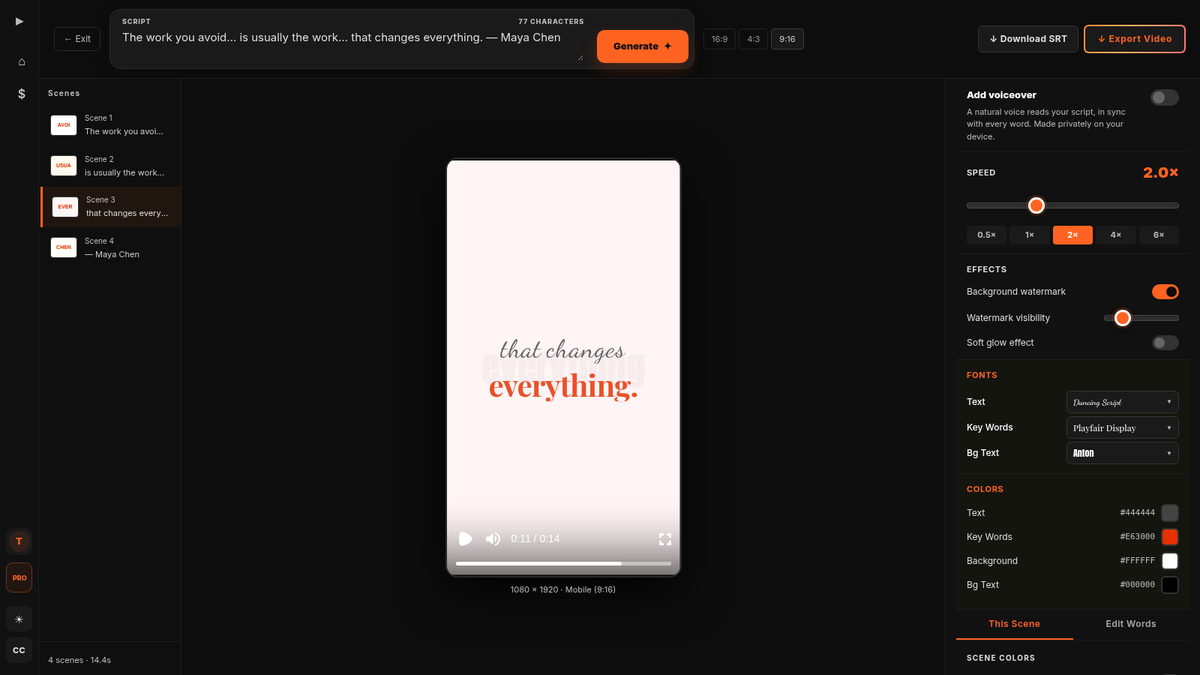
| The work you avoid… is usually the work… that changes everything. — Maya Chen | [The work you avoid…] [is usually the work…] [that changes everything.] [— Maya Chen] | 4 scenes, 14.4 s |
| Ship the rough version. Nobody remembers the draft. They remember that you finished. — Maya Chen | [Ship the rough version.] [Nobody remembers the draft.] [They remember that you finished.] [— Maya Chen] | 4 scenes, 16.3 s |
What that tells you:
- A sentence end always closes a scene. Full stop, question mark, exclamation mark or ellipsis. That's why short sentences (the last row) split exactly where you'd expect. Commas also cut once a scene has two words: "The work you avoid, more often than not, is the work…" split at both commas.
- A long sentence with no punctuation gets cut by length. Row 1 broke after "is", which leaves the first scene hanging on a verb. Row 3 left "that" stranded at the end of scene 2.
- Line breaks are ignored. We pasted the same quote over four lines and got the same scenes as row 1. If you want a cut, add punctuation.
- An ellipsis is the cleanest tool for a quote. It closes a scene without making the line look like three separate sentences. Two of them (row 4) gave three clean beats from one sentence.
- Every extra clause in the attribution costs a scene. Adding ", episode 41" made a fourth scene and added 2.2 seconds of reading for something nobody shares.
Don't change the speaker's words to get a better cut. Punctuation is fair game; wording isn't. If the quote won't split cleanly, pick a shorter excerpt.
Free route: Classic, step by step
- Open the editor, paste the quote into Your script and click Generate styles.
- Click Edit & Export on Classic and sign in with Google. No payment details.
- Under Canvas, pick Mobile (1080 × 1920). The default is Laptop, 16:9.
- In the Word editor, click the one word the quote turns on and set its type to Keyword. In our quote that's "everything." Every word starts as Normal.
- Choose Stomp for hard cuts or Kinetic for smoother slides, set the speed, then Export Video.
Classic shows one word at a time and gives every word the same screen time. We measured it from the editor's frame counter at 30 fps:
- Stomp at 2× (default): 12 frames, 0.4 seconds a word, about 150 words a minute. Our 14-token version ran 5.6 seconds.
- Stomp at 1×: 20 frames, about 0.67 seconds a word, 90 words a minute.
Two quote-specific catches. The em dash before the name counts as a word, so it flashes alone on screen for 0.4 seconds; in Classic, drop it. And the ellipsis doesn't add a pause here, because every word lasts the same. For a reflective quote, 1× reads better than the default. If you want a different pace per line instead, plan it in the text timing calculator. Our TikTok typography guide covers Classic's centred layout and the button column in more detail.
Pro route: Editorial or Minimal, a phrase at a time
Both templates put each scene's words on screen together, with one key word larger and a big faint "ghost" word behind. Editorial sets the line in Dancing Script, the key word in Playfair Display, and the ghost in Anton, on a light background. Minimal uses Inter on off-white. The screenshot at the top is Editorial, scene 3.
- Paste the punctuated quote and click Generate styles.
- Click Edit & Export on Editorial or Minimal.
- Click 9:16 at the top. The default is 16:9.
- Check the scene list on the left. If a scene ends on "is" or "that", go back and fix the punctuation, then click Generate.
- Fix the attribution (next section), set the speed, and click Export Video.
Here's how long each scene stays up, read from the editor's SRT export. Minimal gave identical timings.
| Scene | At 2× (default) | At 1× |
|---|---|---|
| 1. The work you avoid… | 4.07 s | 8.13 s |
| 2. is usually the work… | 5.00 s | 10.00 s |
| 3. that changes everything. | 2.20 s | 4.40 s |
| 4. — Maya Chen | 3.13 s | 6.27 s |
| Total | 14.4 s | 28.8 s |
That's 13 words in 14.4 seconds at 2×, about 54 words a minute, well under the 160–180 words a minute the BBC's subtitle guidelines recommend for subtitles. Each word animates in, so a scene isn't readable from its first frame, but there's slack. Our advice: leave Pro styles at 2× for quotes. At 1× the same quote takes 28.8 seconds, and the last scene of a long quote can feel like it's waiting for applause.
The timings aren't even. Scene 3 has two words and gets 2.2 seconds; scene 2 has five and gets 5. The punch line is usually short, so it gets the least time. If yours needs to land, give it its own sentence so it isn't the tail of a longer scene.
Keep the attribution quieter than the quote
This is the mistake we'd have shipped without looking. In both Pro templates, the name scene treats the surname as the key word: big, orange, with "CHEN" as the ghost word behind it. On a phone, the name was the loudest thing in the video.
Fix it in the editor:
- Click the attribution scene in the scene list.
- Open Edit Words, tap the surname, switch off Make this a key word, and set Text Size to Small. The name drops onto one line. It keeps its colour; change Color in the same panel if you want it grey.
- Open This Scene and switch off Background watermark under Visual effects. That's the ghost word, not the TypographyEdit watermark. The other scenes keep theirs.
Same logic in Classic: leave the name as Normal and drop the dash. And keep numbers out of the attribution. In our style previews, "episode 41" put a giant "41" on the Classic and Dynamic cards before the quote had said a word.
Where it can go, and in which shape
TypographyEdit exports three shapes: 9:16 (1080 × 1920), 4:3 (1024 × 768) and 16:9 (1920 × 1080). There's no square or 4:5. Here's what the platforms say, checked today:
| Platform | What its help page says | Shape we'd use |
|---|---|---|
| YouTube Shorts | Up to 3 minutes, square or vertical | 9:16 |
| All videos are now reels, which can be any length or orientation; 1080p, MP4, 24–60 fps recommended | 9:16 | |
| Aspect ratio 1:2.4 to 2.4:1, at least 3 seconds from desktop, up to 15 minutes; keep text away from the edges | 4:3 for the feed, or 9:16 | |
| Instagram Reels, TikTok | Vertical; see our safe zone checker for where the app buttons sit | 9:16 |
Every export is 30 fps, which sits inside Facebook's recommended range. A 14-second quote clears LinkedIn's 3-second minimum easily.
Whose words, and whose name
The safest quotes are your own lines, a guest who agreed to be clipped, or text you know is in the public domain. If it's a famous quote, find it in the original book, talk or interview before you put a name under it. And note that YouTube's Shorts upload page warns that copyright-protected material in a Short can lead to a Content ID claim or a takedown. That applies to any music you add later, too.
What this won't do
- No music. Add a track afterwards in the platform's own editor or in CapCut, Edits or Premiere Pro. If you want the quote read aloud, the built-in voiceover times each word to a synthetic voice.
- No photo or footage behind the text. Backgrounds are solid colours.
- No square or 4:5 export. For an Instagram feed post in those shapes, use another tool.
- Free means Classic with a watermark. Editorial and Minimal exports need Pro. SRT captions are free on both.
If a word-by-word Classic quote is enough, it costs nothing. Paste your quote and try it →
Related reading
- Kinetic typography with a voiceover: measured voice lengths and how words sync
- How to make a typography video for TikTok
- The Minimal template and the other templates
- Make kinetic typography readable on a small screen and the other guides
- SRT reading speed checker, for the captions file you export alongside
- TypographyEdit home · Pricing · Documentation
Sources
- YouTube Help: Upload YouTube Shorts
- Meta Business Help Center: Requirements for Facebook Reels
- LinkedIn Help: Video sharing troubleshooting (file requirements)
- BBC Subtitle Guidelines (subtitle speed)
- TypographyEdit pricing
All external pages checked November 29, 2026. Scene splits, frame counts and SRT timings measured in the TypographyEdit editor on November 29, 2026. The example quote and name are our own placeholders. YouTube, Facebook, LinkedIn, Instagram and TikTok are trademarks of their respective owners. TypographyEdit is not affiliated with any of them.